Billing & Usage
Settings → Billing shows your plan, its limits, current usage, and subscription status.
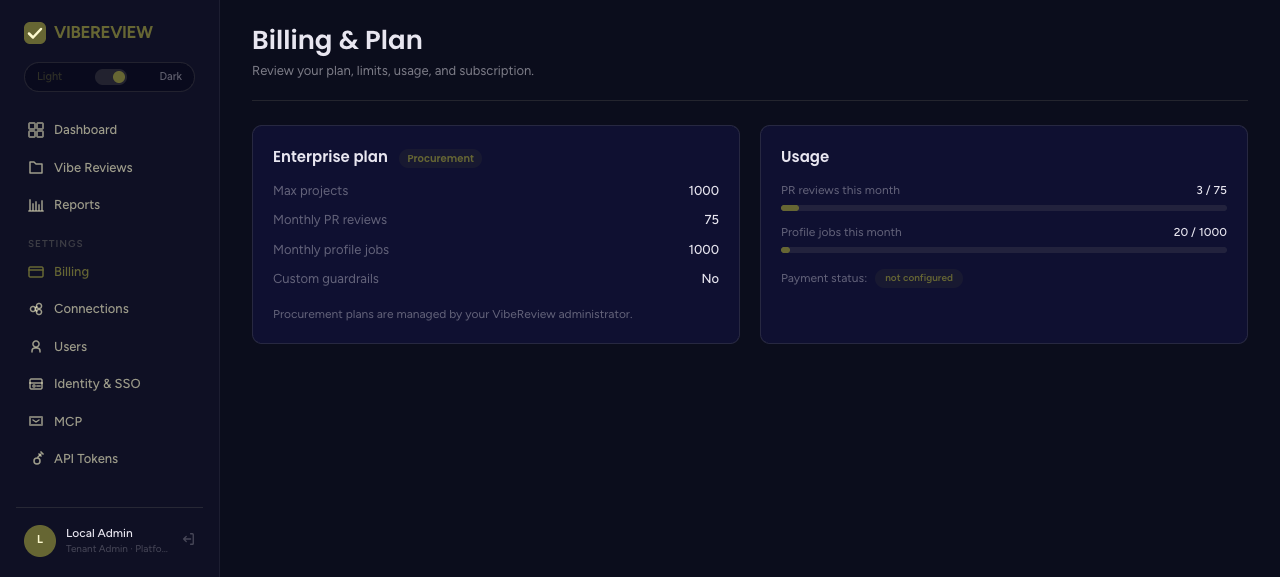
Plan & limits
The plan card names your subscription and lists the limits for your tier. The limits shown here always reflect your actual plan; the four tiers are:
| Limit | Demo | Individual | Team | Enterprise |
|---|---|---|---|---|
| Repos / projects | 1 | 5 | 20 (then $10/repo) | Unlimited |
| Codebase / profile jobs | 1 total | 15 / month | 50 / month | Unlimited |
| PR reviews | 25 total | 75 / month | 1,000 / month | Unlimited |
| Custom guardrails | ❌ | ❌ | ✅ | ✅ |
| Architectural profiling | ❌ | ❌ | Quarterly per repo | Quarterly + on-demand |
| Audit-log retention | 7 days | — | 90 days | 1 year |
See Plans & Pricing for the full comparison and current prices.
The screenshot above is from the guide's staging tenant, whose plan was configured with example limits (e.g. Monthly PR reviews 75, Monthly profile jobs 1000, Custom guardrails: No). Those are that tenant's settings, not the standard limits of any public tier — use the table above and the pricing page for the real per-tier numbers.
Usage
The Usage panel tracks consumption against your plan's limits for the current billing period, for example:
- PR reviews this month —
3 / 75 - Profile jobs this month —
20 / 1000
These counters reset each month. Two of the most common ways to consume quota are PR Review (each monitored PR open/commit) and profile jobs (creating a project, running architecture profiles, and scheduled reprofiles).
Subscription status
A Payment status field reflects the subscription state (e.g. not configured). Enterprise plans are typically handled via Procurement rather
than self-serve payment.
Keeping usage healthy
- Profile jobs — tune each project's reprofile cadence (default every 30 days) under the project's Settings tab so you don't spend jobs more often than you need.
- PR reviews — enable PR Review on the repositories that matter most if you are near the monthly cap.
The numbers above are examples from the environment used in this guide. Your tenant's limits depend on your subscription.