API Tokens
Settings → API Tokens is where you create the credentials the CLI uses to
authenticate and link a workspace to a project. A token is what you pass to
vibereview init (or set as VIBIREVIEW_API_TOKEN).
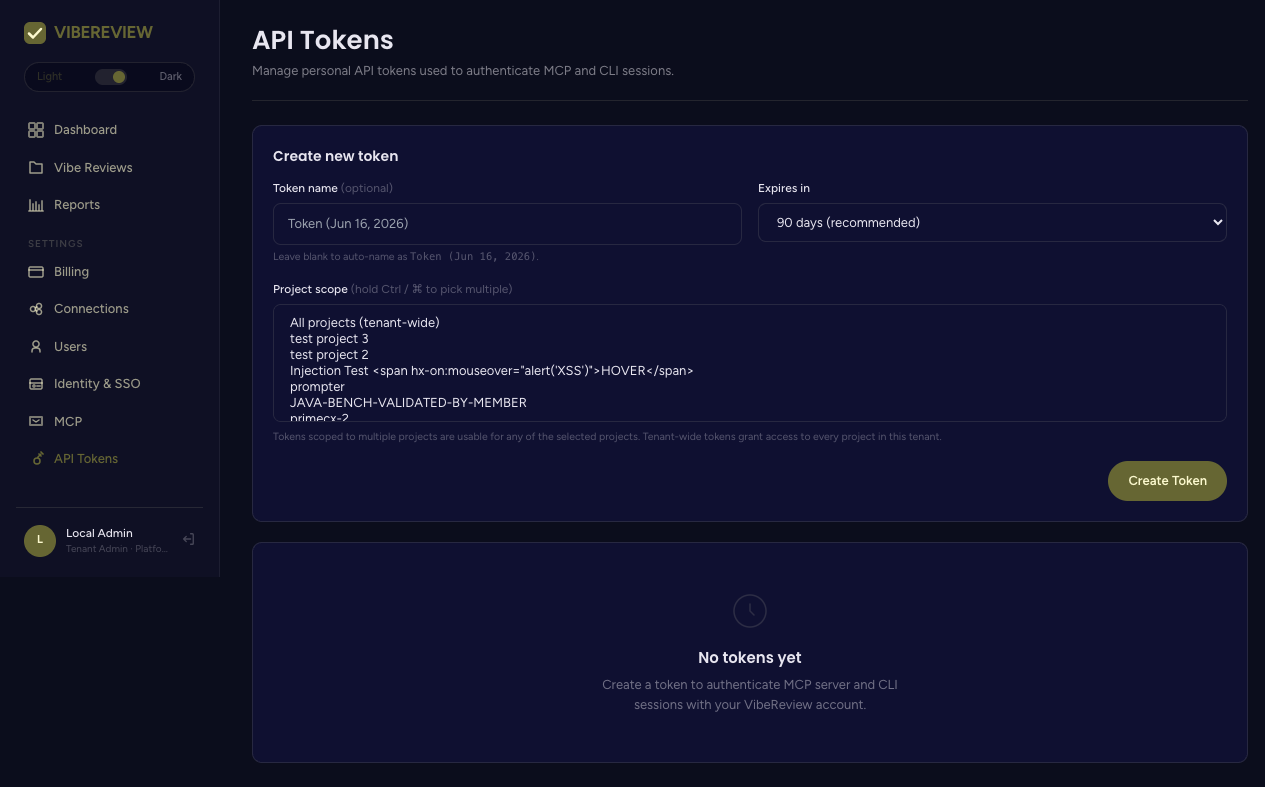
Creating a token
Under Create new token, set:
| Field | Notes |
|---|---|
| Token name | Optional. If blank, it auto-names as Token (<date>). |
| Expires in | 7 days, 30 days, 90 days (recommended), 180 days, 1 year, or Never expires (admin only). |
| Project scope | One or more projects, or All projects (tenant-wide). Hold Ctrl/⌘ to pick multiple. |
Click Create Token, then copy the token immediately — it is shown once.
Token scope
- A token scoped to specific projects is usable for any of the selected projects only.
- A tenant-wide token grants access to every project in the tenant.
During init, the CLI calls the API with this token and offers only the projects
the token is allowed to use. If a token has an empty allow-list, the CLI reports
that no projects were visible.
Using a token with the CLI
# As a flag
npx -y @securityreviewai/vibereview@latest init --api-key <YOUR_TOKEN>

# As an environment variable (note the VIBIREVIEW spelling)
export VIBIREVIEW_API_TOKEN=<YOUR_TOKEN>
npx -y @securityreviewai/vibereview@latest init
See CLI → Installation for the full linking flow.
Managing tokens
Existing tokens are listed below the create form (when present). Revoke a token
when it is no longer needed or may be exposed; rotate by creating a new token and
re-running init/switch-project.
Prefer the shortest practical expiry and the narrowest project scope. Reserve tenant-wide and Never expires tokens (admin only) for automation that genuinely needs them.